Coolify
Send Coolify's own mail, and mail from apps on Coolify, through Reloop.
Point Coolify at Reloop SMTP. The same API key sends Coolify's password resets and alerts, and mail from the apps you deploy there.
Create the key in the Reloop dashboard. The address you send from has to be on a verified domain.
Coolify's own email
Open email settings
In Coolify, go to Settings → Email.
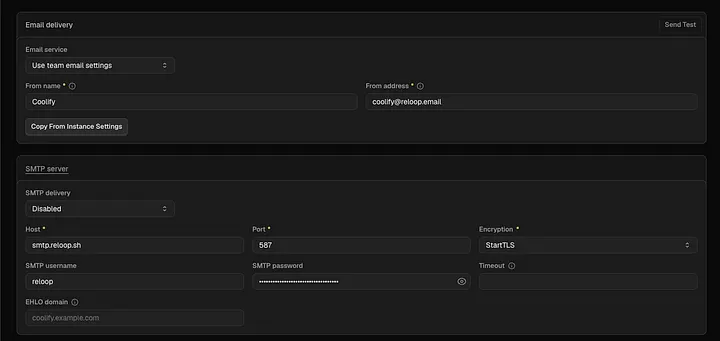
Enter the Reloop server
Turn SMTP on and use these values. The username and the password are both your API key.
| Field | Value |
|---|---|
| Host | smtp.reloop.sh |
| Port | 587 |
| Encryption | StartTLS |
| SMTP username | Your API key (rl_...) |
| SMTP password | The same API key |
| From address | hello@yourdomain.com |
| From name | Coolify |
Save and send a test
Click Save, then send the test from the same page. The message shows up in your Reloop logs.
Apps you deploy on Coolify
Add the API key
Open the application, go to Environment Variables, and add the key as a secret.
RELOOP_API_KEY=rl_your_api_keyRedeploy
Save and redeploy so the app picks up the key. Send with the SMTP relay or an SDK.
To run Reloop itself on Coolify, follow Deploy on Coolify.
Was this page helpful?